

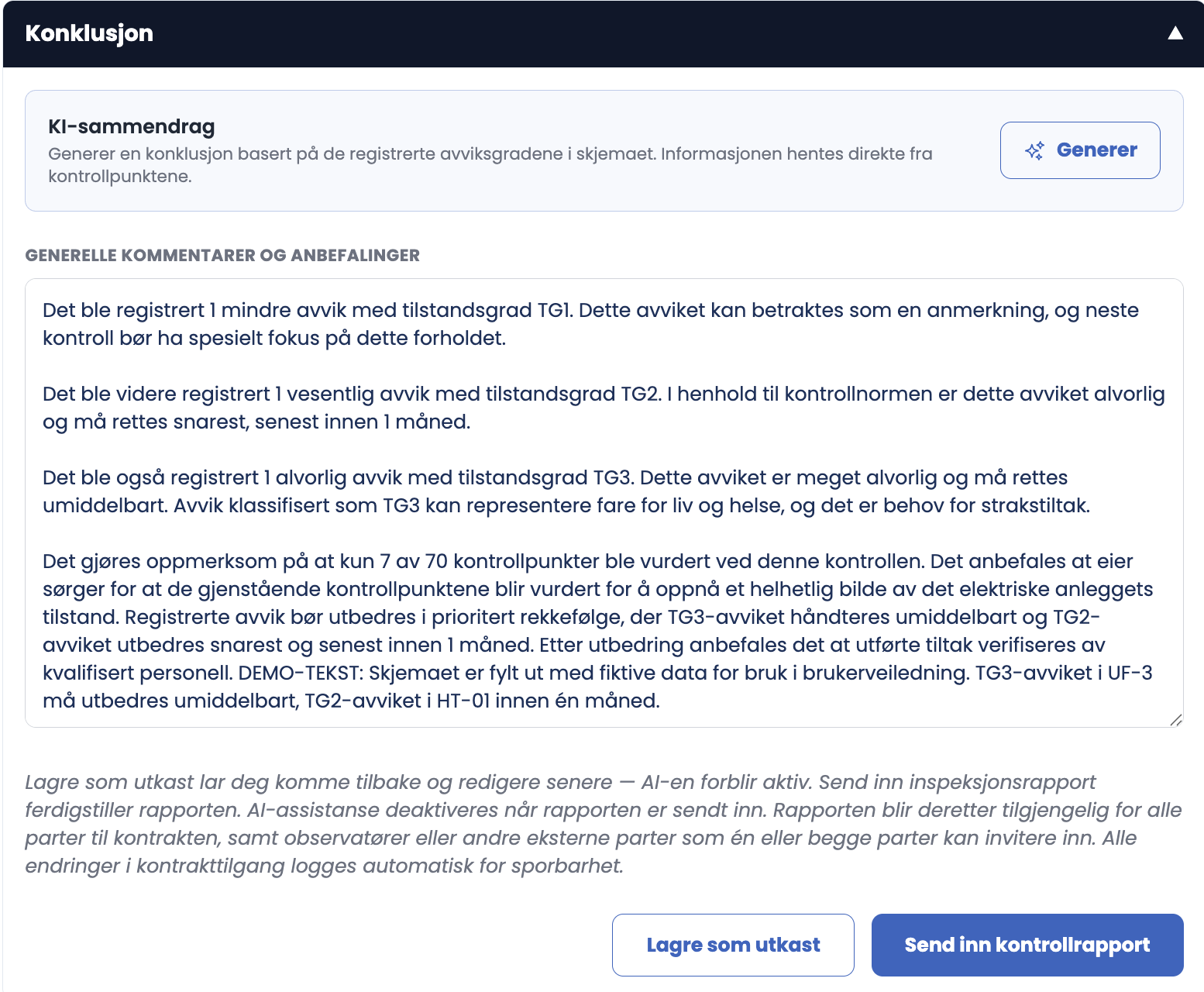
At the bottom of the form you write the conclusion, and you can let AI suggest one to start from.
How to do it
- Click "Get AI summary" in the AI summary box. The button shows "AI is thinking…" while the summary is being written.
- The text is written into the GENERAL COMMENTS AND RECOMMENDATIONS field.
- Read it through, edit freely, and add your own assessments, maintenance recommendations and remarks on expected service life.
Good to know
- The summary is based solely on the deviation grades you have recorded in the form: how many points have been assessed, and how they are distributed.
- That also means it mentions how many of the 70 points have not been assessed. If you generate halfway through, it summarises a half-finished form.
- The text is fully editable, and you don't have to use the summary at all.
Tips
- Use Get AI summary only when all inspection points have been assessed and the thermography protocol is complete.
- Rewrite the opening sentence in your own words. The customer notices the difference between a text that has been read through and one that has not.
- Add what the AI cannot know: the age of the installation, what you would recommend prioritising, and what should be looked at at the next inspection.
- Check that the conclusion actually mentions the TG3 findings. Those are the ones that require immediate action.
Can I write the conclusion myself instead?
Yes. The field is an ordinary text field. The AI summary is a starting point, not a requirement.